Skip to content
VPLC
Virtual PLC platform

The software PLC platform, engineered for the AI era

VPLC turns standard hardware into a PLC — from single-board computers to industrial PCs and cloud VPS. Write and debug IEC 61131-3 Structured Text together with your AI agent, connect I/O over Modbus and MQTT, publish data over OPC UA and manage every site remotely.

  • Windows
  • Linux
  • macOS
  • ARM · x86
  • Docker · VPS
The platform

Four components. One control system.

Use the runtime on its own on a single device, or combine all four components into a distributed system with centralized data exchange, cloud access and AI-assisted engineering.

RuntimeCLI · GUI

VPLC

The runtime that turns any computer into a PLC

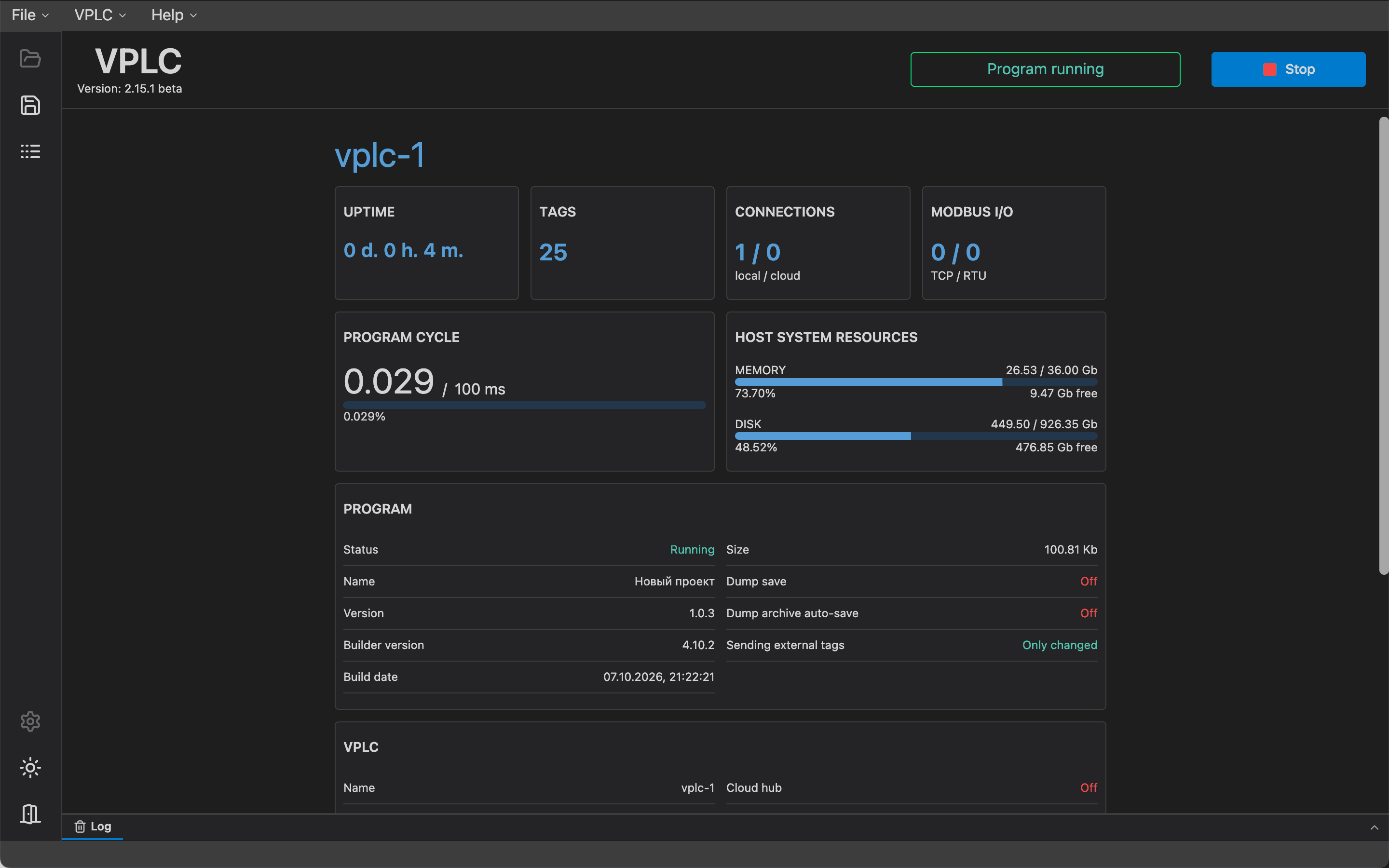
VPLC is the execution core of the platform. It runs your Structured Text program in a cyclic scan, polls field devices and keeps process data safe — on hardware you already own. Run it headless as a system service or with a desktop GUI.

Runs on: Linux on x86-64 and ARM (Raspberry Pi, NanoPi, Wiren Board and other SBCs), Windows, macOS, Docker
VPLC
VPLC desktop app showing runtime status, cycle time and connected Modbus devices
  • Classic scan cycle, native speed

    Your ST program is compiled to native code and executed cyclically. Field communication runs in separate threads and syncs through a shared process image, so network latency never blocks your logic.

  • Modbus master and slave

    Modbus TCP and Modbus RTU over RS-485 or through a TCP gateway, with batched register reads and writes and per-device health monitoring. A built-in Modbus TCP slave exposes variables to HMI and SCADA.

  • MQTT out of the box

    Map variables to topics for publish, subscribe or both, with retained messages. Works alongside Wiren Board controllers without touching their stock firmware.

  • Program updates without a restart

    A new program is compiled on the device in the background while the current one keeps running, then switched in within moments — the controller is never restarted.

  • Data that survives a power cut

    Retained variables are saved to checksummed dumps with a backup copy and restored on restart. Dedicated task groups handle start-up after a crash and shutdown on error.

  • Diagnostics you can program against

    The live status of every Modbus device and MQTT broker is available right in ST. Runtime errors are reported against the original ST source line.
IDEStructured TextAI

VPLC Studio

A modern IEC 61131-3 IDE, ready for AI agents

Write, verify and deploy Structured Text in a fast desktop IDE built on the same editor engine as VS Code. Configure field devices, upload to any controller — on your desk or across the cloud — and watch live values right in your code.

Runs on: Windows x64, macOS (Apple Silicon and Intel)

VPLC Studio
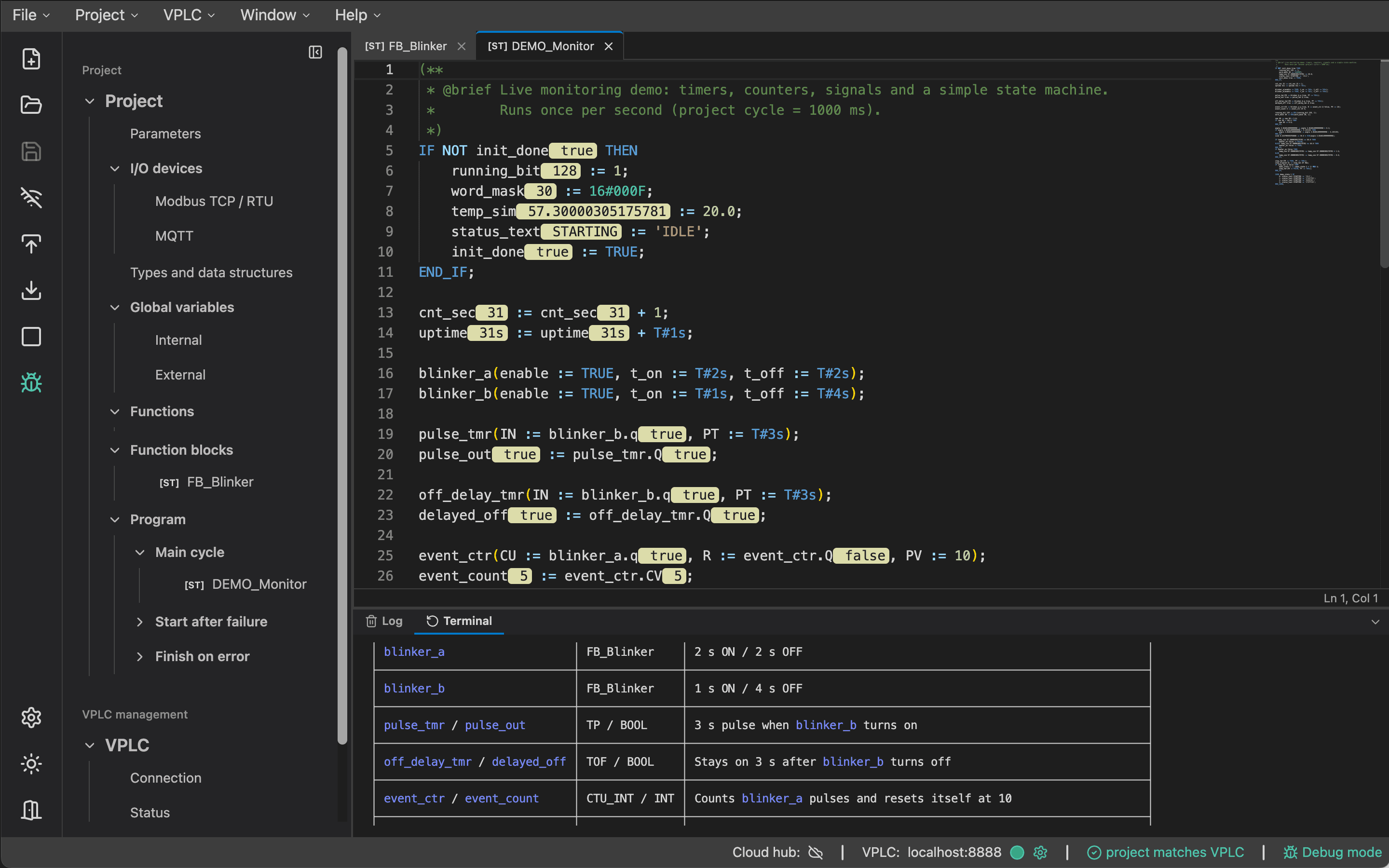
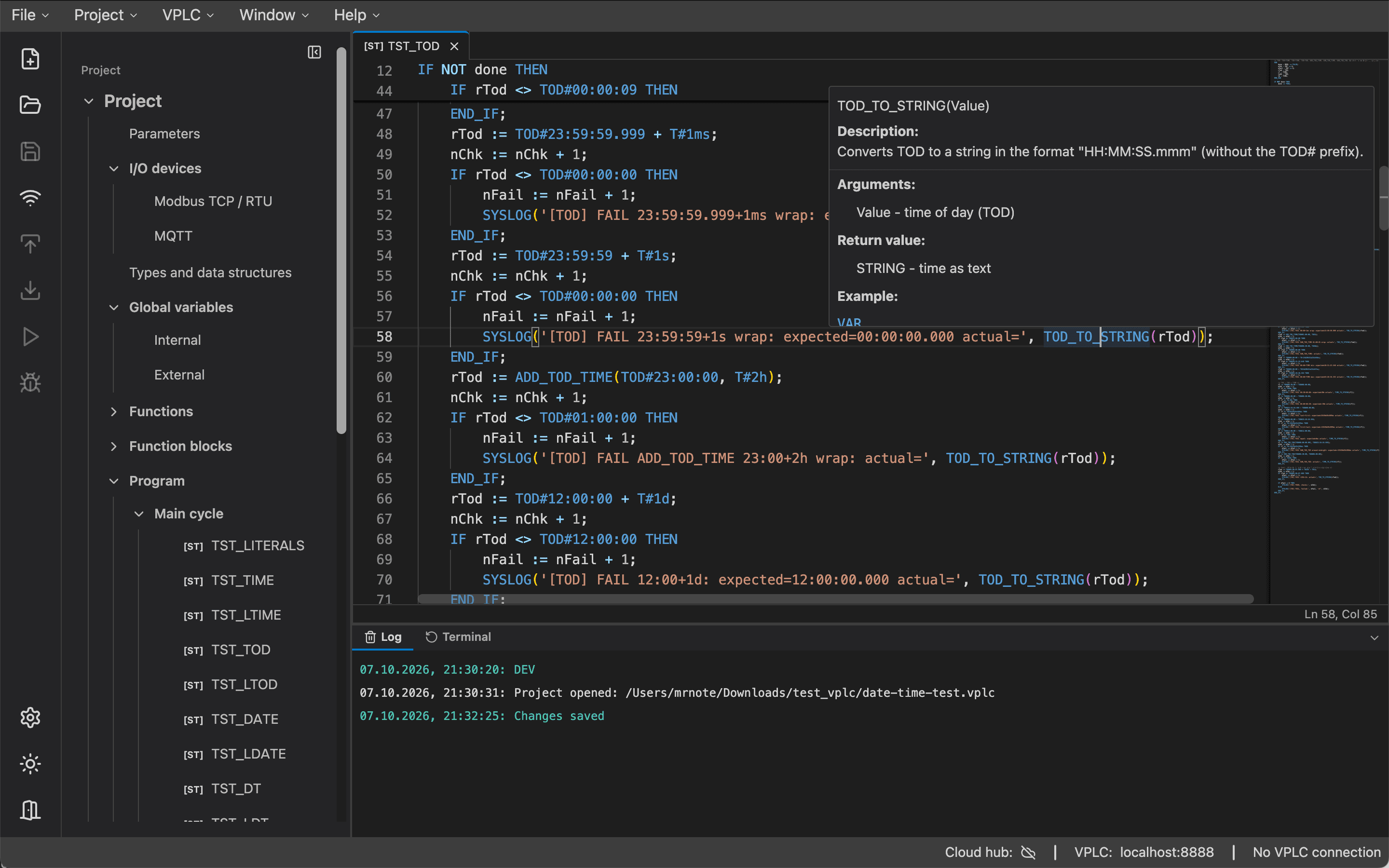
VPLC Studio editor with Structured Text code, project tree and live variable values
  • A real code editor for ST

    Syntax highlighting, context-aware completion, hover documentation, formatting and instant diagnostics for tasks, functions and function blocks.

  • Full IEC type system

    8- to 64-bit integers, REAL and LREAL, STRING, DATE, TIME, TOD and DT, user structures, arrays and local TYPE…END_TYPE declarations.

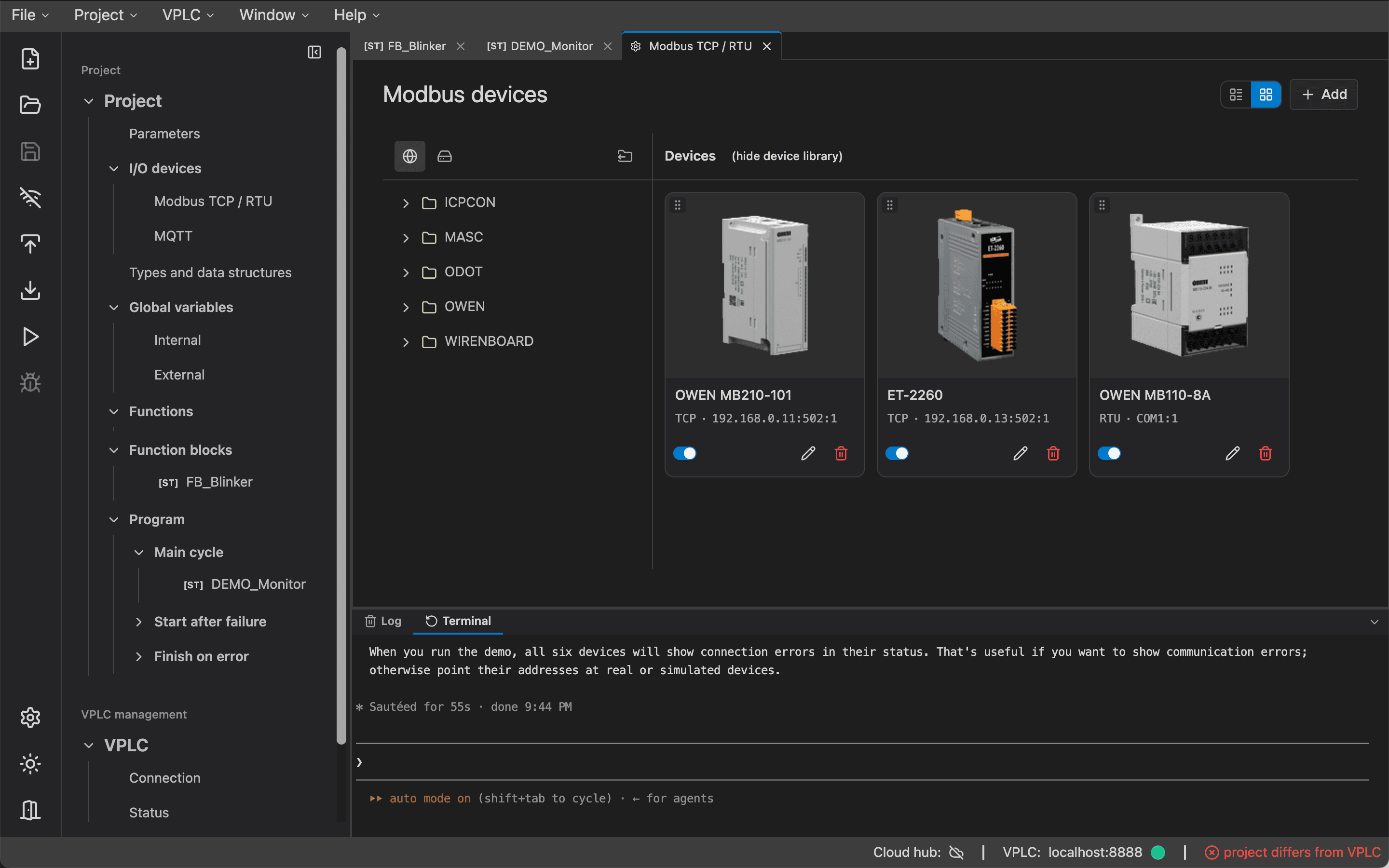
  • Field devices without the busywork

    Drag Modbus devices in from a reusable template library, describe the register map once and access registers from ST by name. Add MQTT brokers and topics the same way.

  • Debug mode with inline values

    Connect to a running controller and see live variable values next to the code that uses them. Monitor and write variables in HEX, BIN or DEC.

  • Errors where they belong

    Problems from the native build on the controller are mapped back to the exact ST line, so you never have to read generated code.

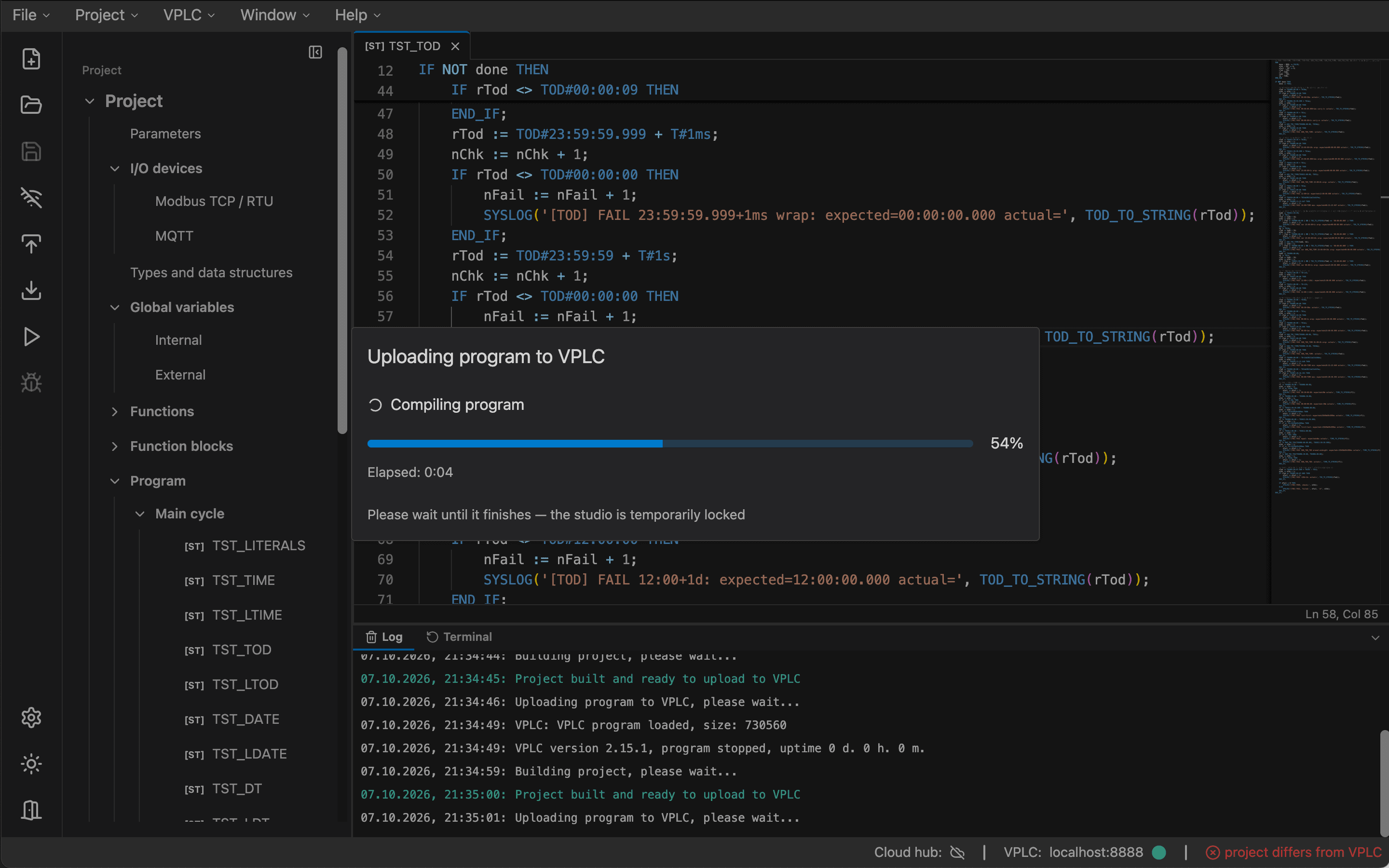
  • Deploy with confidence

    One-click upload with build progress, automatic version numbering and the full project source stored on the controller under password protection.

OPC UACLI · GUI

VPLC Server

One OPC UA endpoint for your whole fleet of controllers

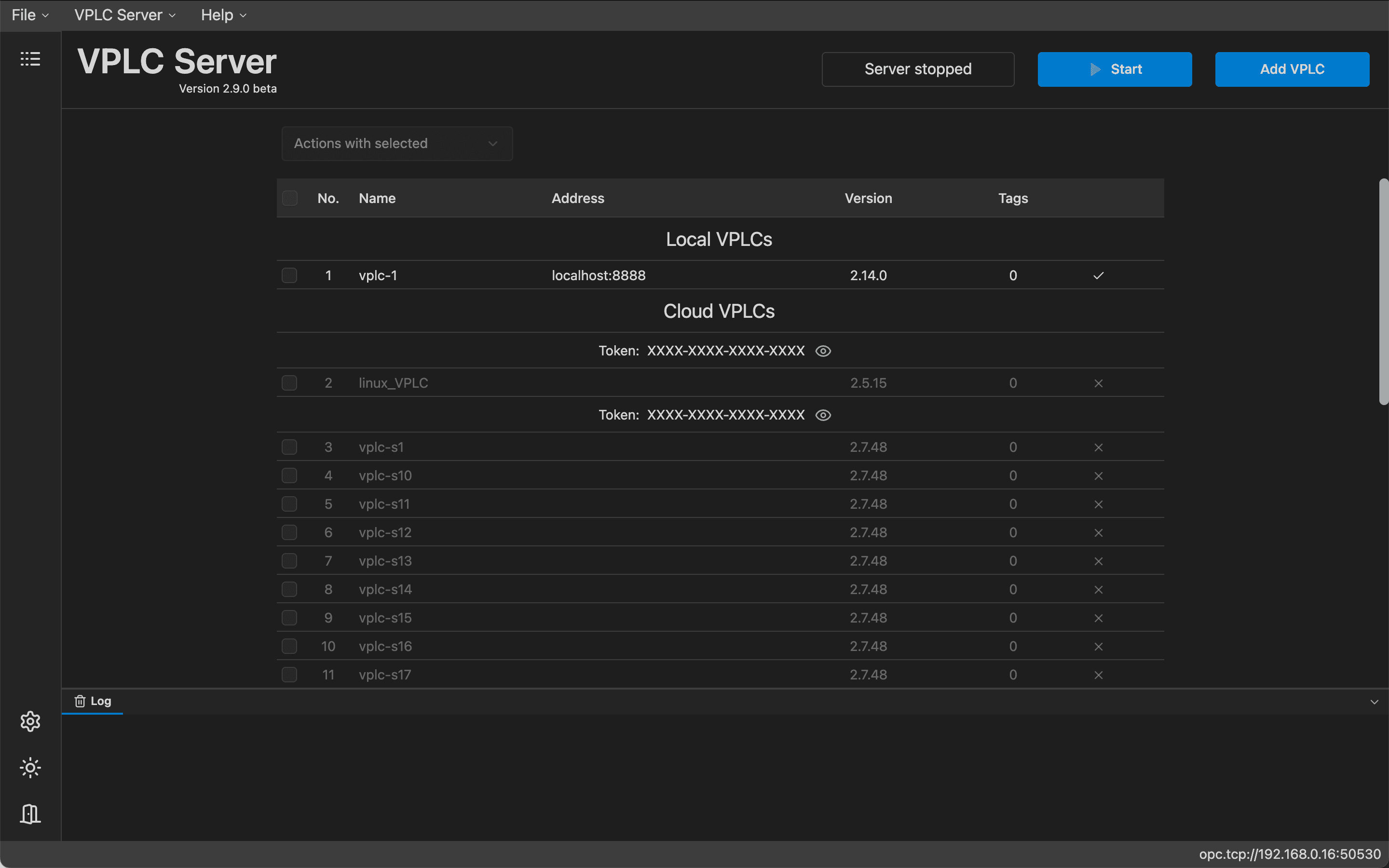
VPLC Server aggregates multiple VPLC instances — on the local network or connected through the cloud — and publishes their variables over industrial OPC UA. SCADA, MES, historians and analytics tools read and write process data through a single standard interface.

Runs on: Linux, Windows, macOS

VPLC Server
VPLC Server app listing connected controllers and OPC UA server status
  • Industrial OPC UA

    A standards-based OPC UA server on a configurable port that any compliant client can browse, read and write.

  • Local and remote controllers

    Add controllers by IP address or by cloud token and activate or deactivate them on the fly — no restart required.

  • Centralized exchange and logging

    One place to collect, monitor and log data from every controller in the system.

  • GUI, CLI or embedded

    Manage it from a desktop app, run it headless with a scriptable CLI, or embed it in your own software through a JSON integration mode.

Cloud hubRemote access

VPLC Cloud

Reach every controller, wherever it runs

VPLC Cloud is a relay hub that connects controllers, Studio and Server across sites — without public IP addresses, VPNs or port forwarding. Controllers dial out to the hub, and everything else connects to them by token.

Runs on: Hosted hub — nothing to install

Two remote VPLC controllers, VPLC Studio and VPLC Server connected through the VPLC Cloud hub without public IP addressesVPLC Cloudrelay hubVPLCSite A · behind NATVPLCSite B · LTE routerVPLC StudioEngineer, anywhereVPLC ServerOPC UA for SCADA
Outbound-only connections · no public IP · no VPN · access by token
  • Works behind NAT and firewalls

    Controllers open an outbound connection to the hub, so remote sites need no inbound ports.

  • Token-based access

    Each controller is reached by its cloud token — from Studio, from VPLC Server or from operator tools.

  • Remote engineering

    Monitor, upload programs and diagnose a remote controller from Studio exactly as if it were on your desk.

  • Hybrid architectures

    Mix local and cloud-connected nodes freely and feed remote controllers into VPLC Server for OPC UA access.

AI-native engineering

Your AI agent, wired straight into the control project

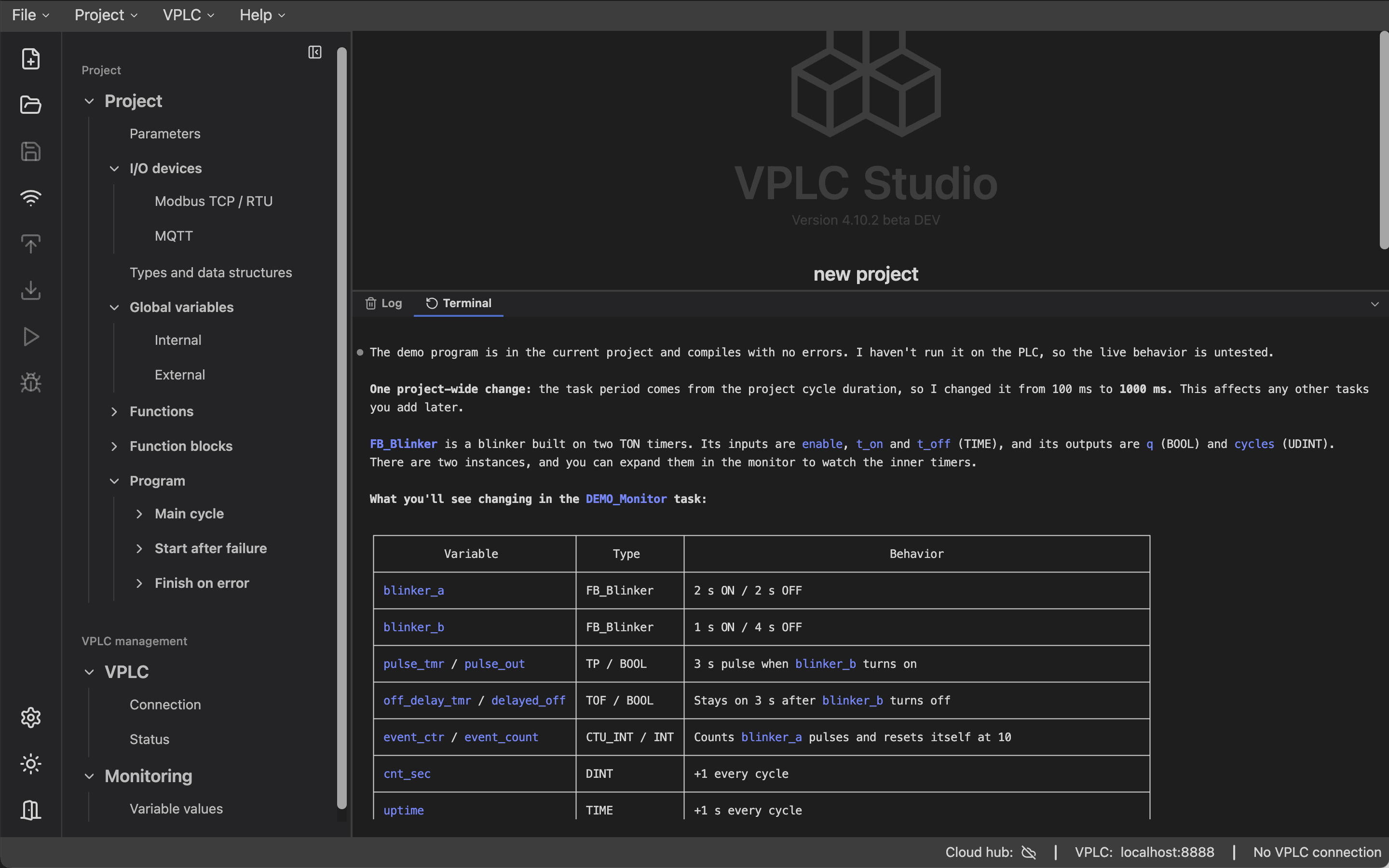
VPLC Studio opens the entire engineering workflow to AI. Describe how the process should behave — the agent creates variables and types, writes Structured Text, configures Modbus devices, compiles the project and fixes errors, while you review every change live in the editor.

  1. 01
    Prompt

    Describe the control logic in plain language

  2. 02
    Studio

    The agent writes ST, configures I/O and compiles

  3. 03
    VPLC

    You review and upload — switched in without a controller restart

  4. 04
    Server · Cloud

    Data flows to SCADA over OPC UA and to remote sites

  • Built-in MCP server

    Claude Code, Cursor, Codex, Gemini CLI, opencode or any MCP-compatible client connects over Streamable HTTP. 57 tools cover projects, tasks, functions, function blocks, types, variables, Modbus, MQTT, compilation and documentation search.

  • Agents in the built-in terminal

    Run claude, cursor-agent, codex, gemini or opencode right inside Studio. Connection configs are generated for you — zero setup.

  • Claude CodeCursorCodexGemini CLIopencodeAny MCP client
VPLC Studio · Terminal — claudeMCP connected

› Add a Modbus TCP flow meter at 192.168.1.40 and alarm if flow drops below 2 m³/h for 10 s while the pump runs

● I'll add the device from the library, then extend the main task.

✓ vplc-studio.create_modbus_device_from_library(FlowMeter → FM40, 192.168.1.40:502) → ok

✓ vplc-studio.create_var(lowFlowTimer : TON) → ok

✓ vplc-studio.update_task_code(main) → ok

+lowFlowTimer(IN := pump AND MB_FM40.Flow < 2.0, PT := T#10S);
+lowFlowAlarm := lowFlowTimer.Q;

✓ vplc-studio.compile_project → 0 errors, 0 warnings

● Done. Review the change in the editor and upload when ready.

Example session: an AI agent adds a Modbus flow meter, writes a low-flow alarm in Structured Text and compiles the project through the VPLC Studio MCP server.
  • Human in the loop

    Every edit an agent makes appears instantly in the editor, ready for review before upload.

  • Hands off the running process

    Writing values to a live controller deliberately stays outside the agent's toolset.

  • Grounded in the docs

    Agents search the same built-in reference for every type, function and block that you use.

Performance

Up to 208× faster than a classical PLC

Operations completed in 100 ms. VPLC on a mini PC and on a NanoPi NEO single-board computer, compared with a classical hardware PLC.

REAL add / subtract

×110
  • Classical PLC505,000
  • VPLC · NanoPi NEO5,303,350×10.5
  • VPLC · mini PC55,550,000×110

Bit set / read

×208
  • Classical PLC211,200
  • VPLC · NanoPi NEO12,752,000×60
  • VPLC · mini PC44,000,000×208

Double type conversion

×47
  • Classical PLC2,600,000
  • VPLC · NanoPi NEO61,300,000×23.5
  • VPLC · mini PC123,760,000×47

Bars use a logarithmic scale. Multipliers are relative to the classical PLC.

How it works

The classic PLC scan cycle — without the proprietary hardware

VPLC executes your program cyclically, just like a hardware controller. Communication runs in separate threads and syncs with the cycle through a shared buffer, so network latency never blocks your logic.

  1. STEP 1

    Read inputs

    Values from Modbus devices and MQTT topics land in the process image.

  2. STEP 2

    Execute program

    Your ST logic, built in VPLC Studio, runs over the project variables.

  3. STEP 3

    Write outputs

    Results go to output modules and MQTT topics, and the cycle repeats.

repeat every cycle · cycle #1,024

Program updates without restarting the controller

When you upload from Studio, the controller compiles the new program in the background while the current one keeps running. Then it switches programs within moments — the VPLC process is not restarted, and retained variables are restored.

Architecture

Scales from one device to a distributed system

Start with a single controller on a bench. Add VPLC Server for OPC UA and VPLC Cloud for remote sites when you need them — the program stays the same.

Engineering
VPLC Studio

develop · debug · deploy

AI agents

Claude Code · Cursor · Codex

Control
VPLC

ST program · scan cycle

retained data · fast updates
⇅ data exchange
VPLC Server

OPC UA · logging

Field & systems
I/O modules

Modbus TCP · RTU · MQTT

External systems

SCADA · MES · historians

VPLC Cloud
connects every component across sites — monitoring, updates, diagnostics
hybrid · distributed
Key features

Built for industrial reliability

  • Built-in diagnostics

    Live status of every Modbus device and MQTT broker, right in your ST code.

  • Fast program updates

    Built in the background, switched in within moments — no restart.

  • Retained data

    Checksummed dumps with a backup copy survive power loss.

  • Cross-platform

    Windows, Linux and macOS — industrial PCs to single-board computers.

  • Light on resources

    Runs on low-power ARM boards and inexpensive VPS instances.

  • IEC 61131-3 ST

    Familiar Structured Text with a rich standard library.

  • Open protocols

    Modbus TCP/RTU and MQTT for I/O, OPC UA for system integration.

  • Remote access

    Monitor, update and diagnose installations from anywhere.

VPLC Studio

Develop, debug and deploy in one environment

Everything from the first variable to the running process — in one desktop app, in English or Russian.

Structured Text, with the comfort of a modern IDE

The editor understands your whole project: variables, user types, function blocks and the standard library.

  • Context-aware completion, including struct fields and FB outputs
  • Hover documentation for every standard function
  • Formatter, comment toggling and instant diagnostics
VPLC Studio — ST editor
VPLC Studio ST editor with code completion

Data types

Bit & integer
BOOLSINTUSINTBYTEINTUINTWORDDINTUDINTDWORDLINTULINTLWORD
Floating point
REALLREAL
Date & time
TIMELTIMEDATELDATETODLTODDTLDT
Text
STRING

Plus user-defined structures, arrays and local TYPE…END_TYPE declarations.

Standard library

  • Type conversion270+ functions across numeric, string and date/time types
  • Date & timeArithmetic, splitting and concatenation for DATE, TIME, TOD and DT
  • Math & arraysABS, SQRT, LIMIT, MIN/MAX, SUM_AR, MOVE_AR, FIND_EQP_AR and more
  • StringsCONCAT, FIND, INSERT, MID, REPLACE, TRIM, UPPER and more
  • Function blocksTON, TOF, TP, CTU / CTD / CTUD (INT, DINT, UDINT), R_TRIG, F_TRIG, SR, RS
Integrations

Speaks the protocols your plant already uses

  • Modbus TCP
    Master and slave
  • Modbus RTU
    RS-485 and TCP gateways
  • MQTT
    Publish, subscribe, retain
  • OPC UA
    Via VPLC Server
  • Wiren Board · JetHome
    Controllers over MQTT, stock firmware intact
  • SCADA · MES
    Any OPC UA client
  • MCP
    Claude Code, Cursor, Codex…
  • Docker
    Containerized runtime
Use cases

Where VPLC fits

  • Industrial process control

    Control and dispatching on industrial sites, integrated with SCADA over OPC UA.

  • Smart buildings

    HVAC, lighting, metering and other engineering systems on affordable hardware.

  • Labs & education

    Test benches and training stands without costly proprietary controllers.

  • Remote equipment fleets

    Distributed installations monitored and updated centrally through the cloud.

  • IoT at the edge

    Local processing close to sensors and devices, with MQTT to the rest of the stack.

  • Rapid prototyping

    Go from idea to working control logic in hours with an AI agent at your side.

Get started

Up and running in minutes

  1. 1

    Install the runtime

    Install VPLC on a Linux device with a single install script, or use the desktop app on Windows and macOS.

  2. 2

    Install VPLC Studio

    Download the IDE for your OS, create a project and describe your I/O.

  3. 3

    Write, upload, run

    Write the logic yourself or with your AI agent, connect to the controller and upload.

  4. 4

    Install VPLC Server

    Need OPC UA for SCADA or MES? Install VPLC Server and add your controllers by IP address or cloud token.

FAQ

Frequently asked questions

What is a virtual PLC?

A virtual (software) PLC runs control logic on general-purpose hardware instead of a dedicated controller. VPLC keeps the familiar PLC model — a cyclic program in IEC 61131-3 Structured Text working over a process image — while letting you choose the hardware, scale it and manage it remotely.

How much does VPLC cost?

VPLC is in active development. The beta of all components is distributed free of charge. Commercial licensing terms will be announced before the general release.

Is VPLC ready for production?

VPLC is currently a public beta. It is a great fit for pilots, test benches, education and new projects. If you are planning a production deployment, write to us — we will help you assess it.

Which hardware can run VPLC?

Any machine running Linux, Windows or macOS — from ARM single-board computers like Raspberry Pi, NanoPi or Wiren Board to industrial PCs and cloud VPS instances. VPLC can also run in Docker containers.

Which programming languages are supported?

VPLC is programmed in Structured Text (IEC 61131-3), with a rich standard library of functions and function blocks, user-defined functions, function blocks, structures and arrays.

Do I need AI to use VPLC?

No. AI features are entirely optional — VPLC Studio is a complete IDE on its own. When you do use AI, you choose the agent and the model: any MCP-compatible client such as Claude Code, Cursor or Codex connects to the MCP server built into Studio.

Can an AI agent change a running process?

Agents work on the project: code, variables, types and device configuration. Writing values to a live controller is intentionally not exposed to agents, and every change is visible in the editor before you upload it.

Which I/O modules can I connect?

Any device that speaks Modbus TCP, Modbus RTU (directly over RS-485 or through a TCP gateway) or MQTT. Reusable device templates in the Studio library make adding a known module a matter of drag and drop.

What happens if a field device goes offline?

Communication runs in separate threads, so the scan cycle keeps going. The status of every device and broker is available in ST, so your program can react — raise an alarm, switch to a safe state or retry.

Contact

Have a question? Ask the engineers.

Hardware choice, I/O integration, a pilot project or anything else about VPLC — write to us or message us on Telegram, and the team behind the platform will get back to you.